For end users, projector ghosting is an annoying image-quality issue. For projector brands, distributors, and OEM buyers, it is also a product-quality and after-sales issue that can lead to complaints, returns, and lower customer satisfaction. That is why projector ghosting should not be viewed only as a user-side problem. It should also be understood from the perspective of product design, signal stability, quality control, and supplier capability.
As a projector manufacturer, we believe this topic matters not only to people using projectors at home, but also to importers, distributors, private-label buyers, and brand owners sourcing home entertainment projectors in volume. If ghosting appears frequently in the market, the result is often higher support pressure, weaker channel confidence, and unnecessary after-sales cost. This is why understanding the causes of projector ghosting is important before mass production and bulk shipment, not just after the product reaches the end user.
What Is Projector Ghosting?
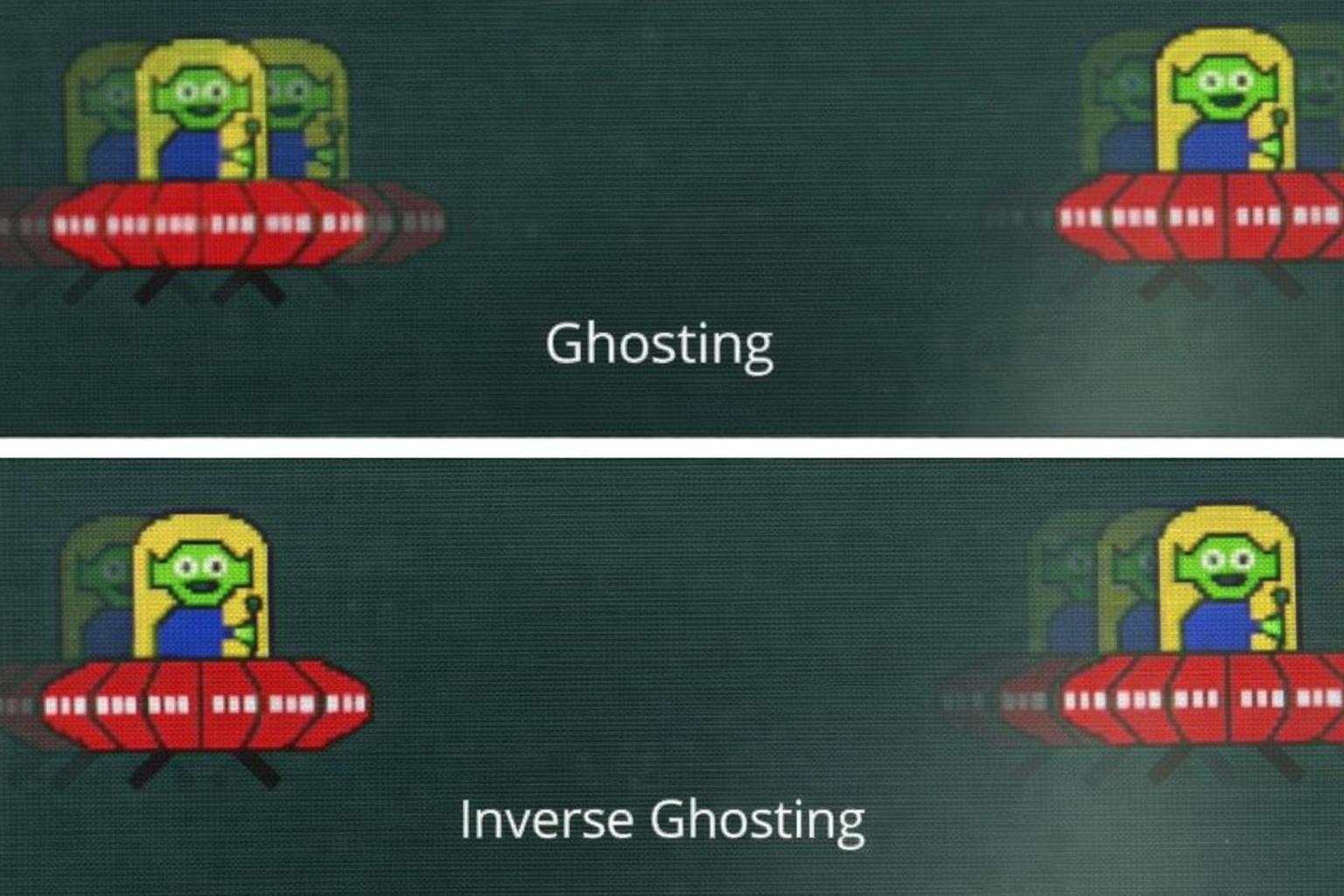
Projector ghosting happens when a faint duplicate image, shadow edge, or motion trail appears beside the main picture. In real use, this may look like blurred subtitles, doubled outlines, or trailing behind moving objects. It is especially noticeable during movies, sports, gaming, and other fast-motion content.
From a consumer perspective, ghosting reduces viewing quality. From a B2B perspective, ghosting can also indicate deeper issues related to signal processing, image tuning, compatibility, optical consistency, or insufficient quality inspection. That is why we see ghosting not only as a visual symptom, but also as a quality-risk indicator that buyers should evaluate carefully.
Common Signs of Projector Ghosting
The most common sign of ghosting is a faint shadow or duplicate edge around the main image. Users may notice it around subtitles, bright text, menu icons, or fast-moving objects on screen. In some cases, motion appears to leave a trail behind it, making the image look soft or unstable.
For B2B buyers, these symptoms often appear later as customer complaints such as “double image,” “unclear picture,” “shadow around text,” or “motion blur during action scenes.” That is why ghosting should be tested using real viewing scenarios rather than only static demo images. A projector that looks fine in a factory demo may still show issues when playing streaming content, sports clips, or gaming footage.
What Causes Projector Ghosting?
Refresh-rate limitations and weak motion handling
One common cause of ghosting is poor motion handling. When the image system cannot respond smoothly to fast-changing content, moving objects may leave visible trails or shadow edges. This is especially important in home entertainment projectors used for action movies, sports, and gaming.
For B2B buyers, this means refresh performance should be evaluated as part of the product solution, not treated as a small technical detail. Even if two projectors have similar resolution and brightness, motion performance may still differ depending on chipset choice, software tuning, and display optimization.
Signal-processing delay
Ghosting can also happen when the projector takes too long to process incoming image data. If the signal path is not well optimized, the picture may appear delayed, doubled, or unstable during movement.
From our perspective as a manufacturer, this is an important reminder that image quality depends on the full system, including motherboard stability, software optimization, optical design, and signal-processing coordination. For importers and OEM buyers, this is why it is important to evaluate the complete product solution rather than relying only on headline specs.
Poor cables, loose connections, or source-device incompatibility
In many cases, ghosting is not caused by the projector hardware alone. Poor HDMI cables, unstable connections, and low-quality adapters can all affect signal transmission and create image issues. This is common in home setups where users connect TV sticks, streaming boxes, laptops, set-top boxes, or game consoles.
For B2B buyers, this means compatibility testing should include multiple real-world source devices. It is not enough to test only one demo unit with one input source. A projector intended for global markets should be evaluated across common use scenarios and accessory conditions.
Improper placement and excessive digital correction
When a projector is placed at the wrong angle or distance, users often rely heavily on keystone correction or digital image adjustment. While these features improve convenience, too much digital correction can reduce effective image precision and make edge artifacts more noticeable.
This is why physical placement still matters. In practical use, some complaints that appear to be ghosting may actually be a combination of misalignment, focus inconsistency, and excessive digital correction. For brands and distributors, this also means setup guidance and user education are part of the total quality experience.
Weak maintenance or outdated firmware
Outdated software, unstable firmware behavior, and poor maintenance can also make ghosting symptoms worse. If a projector’s system is not properly updated or maintained, image-processing bugs or compatibility issues may remain unresolved.
For B2B customers, this is why after-sales technical support and firmware-update capability should be considered part of supplier evaluation. A reliable manufacturing partner should not only ship products, but also support long-term product stability in the market.

How to Fix Projector Ghosting
Adjust refresh rate and resolution settings
The first step is to check whether the source device is outputting a resolution and refresh setting that the projector handles well. In many cases, mismatched settings can lead to unstable motion or shadow-like image effects.
For after-sales teams, this is one of the fastest troubleshooting methods. Before assuming a hardware fault, it is worth checking whether the projector and the source device are working under compatible settings.
Use better cables and more stable connections
If the signal path is unstable, replacing the HDMI cable or removing poor-quality adapters may solve the problem. A high-quality cable with secure connections often makes a noticeable difference in image stability.
For distributors or private-label brands, this also raises a packaging question: if accessories are included with the product, they should meet a dependable quality standard. Otherwise, signal-related complaints may be mistakenly blamed on the projector itself.
Improve projector placement
Proper projector placement remains one of the most practical ways to improve image quality. The projector should be positioned as directly as possible toward the screen, with minimal reliance on heavy digital correction.
This is especially important in home-entertainment products, where users value convenience but still expect a clean and stable image. Product manuals, quick-start guides, and after-sales content should therefore explain both smart setup features and best-practice physical placement.
Clean the lens and keep the system updated
A dirty lens can make image clarity worse, and outdated firmware may affect compatibility or overall image behavior. Regular maintenance and timely software updates can help reduce issues that users describe as ghosting.
For B2B buyers, this is also part of post-sale service planning. Clear maintenance guidance and accessible firmware support can help reduce unnecessary returns and repeated customer complaints.
Why Ghosting Matters for OEM Buyers, Importers, and Distributors
Ghosting matters because it directly affects customer experience, product reviews, after-sales workload, and channel reputation. If end users repeatedly report blurred motion, shadow edges, or double images, distributors may face more returns and support tickets, while brand owners may see lower trust in the product line.
This is why projector ghosting should be treated as a procurement topic, not just a troubleshooting topic. Buyers sourcing projectors in bulk need to understand not only how users can fix ghosting, but also how to reduce the risk of ghosting before the product reaches the market. In our view, that is where a professional manufacturer should add value.
How B2B Buyers Can Reduce Ghosting Risk Before Bulk Orders
Request sample testing with real viewing content
Before placing a bulk order, buyers should test samples with real-use content such as subtitles, fast-motion scenes, sports clips, streaming apps, and gaming input. Static factory demos are not enough to reveal all motion-related image issues.
We always recommend evaluating projectors in conditions that reflect the target market. A model intended for everyday home viewing should be tested like a real home projector, not only like a showroom sample.
Evaluate the full image-processing solution
Buyers should look beyond brightness and resolution. Ghosting risk is also affected by motherboard stability, software tuning, optical coordination, and signal-processing performance. In other words, the projector should be evaluated as a full integrated solution.
This is particularly important for private-label buyers and distributors, because long-term market performance depends on consistency, not just on attractive spec sheets.
Review quality-control procedures
A strong quality-control process is one of the best ways to reduce image-related complaints at scale. Buyers should ask how the supplier handles visual inspection, functional testing, thermal testing, aging tests, and image consistency checks before shipment.
From a manufacturer’s perspective, this is where real reliability is built. If a supplier cannot clearly explain how image defects are identified and controlled, buyers may face avoidable problems after mass delivery.
Confirm firmware and after-sales support
Firmware support matters because not every issue appears during initial testing. Some compatibility or image-processing issues only show up later in different user environments. Buyers should therefore confirm whether the supplier can provide technical follow-up, firmware adjustment, and troubleshooting assistance if needed.
This is especially important for distributors and brand owners building long-term sales channels, where service capability can affect reputation as much as hardware quality.
How We Support B2B Buyers
As a projector manufacturer, we understand that B2B customers are not only buying hardware. They are also buying product stability, manufacturing consistency, quality control, and long-term support. That is why we focus on home entertainment and daily-viewing projector solutions that are suitable for importers, distributors, private-label brands, and OEM/ODM buyers.
Our approach is to help customers reduce risk before mass production through practical product development, image-solution optimization, strict inspection, and support throughout the sourcing process. For buyers targeting everyday-viewing projector markets, this matters because end users expect simple setup, stable picture quality, and fewer image-related problems in real home environments.
We also believe that features such as autofocus, auto keystone, screen fit, obstacle avoidance, HDR support, and short-throw design are not just marketing points. When properly optimized, they help make projector setup easier and reduce the likelihood of image issues caused by poor placement or user error. For B2B customers, that can translate into better end-user satisfaction and lower after-sales pressure.
Conclusion
Projector ghosting may appear to be only an image symptom, but for OEM buyers, importers, and distributors, it is also a quality-control and supplier-evaluation issue. End users can often improve ghosting by changing settings, upgrading cables, improving placement, and keeping firmware updated. But from a B2B perspective, the more important question is how to reduce ghosting risk before products reach the market.
That is why buyers should evaluate motion performance, signal stability, compatibility, software support, and quality-control capability before confirming bulk orders. As a manufacturer, we believe the best solution is not simply to explain how to fix ghosting after shipment, but to help our customers prevent it through better design, better tuning, better testing, and better production control from the beginning.
Projector ghosting is a visual issue where a faint duplicate image, shadow edge, or motion trail appears beside the main picture. It is often most visible during fast-moving scenes, subtitles, or high-contrast content.
No. Some cases come from cables, settings, or placement, but ghosting can also be related to signal processing, system tuning, compatibility, or product consistency. That is why B2B buyers should also evaluate it as a supplier-side quality topic.
Common fixes include adjusting refresh rate and resolution, replacing poor HDMI cables, improving projector placement, reducing excessive digital correction, cleaning the lens, and updating firmware.
Because repeated ghosting complaints can lead to returns, customer dissatisfaction, extra technical support cost, and weaker channel confidence. For B2B buyers, ghosting is closely linked to product reliability and after-sales performance.
They should test samples with real content, evaluate the full image-processing solution, review quality-control procedures, verify source-device compatibility, and confirm firmware and technical support capability before placing volume orders.