4K vs. 1080p: Your Ultimate Guide to Choosing the Right Resolution
What is 4K Resolution? It’s All About the Details
What is 1080p Resolution? The Tried-and-True Classic
The Core Differences Between 4K and 1080p
4K (Ultra HD) | Feature | 1080p (Full HD) |
3840 x 2160 | Resolution | 1920 x 1080 |
~8.3 Million | Total Pixels | ~2.1 Million |
Extremely rich, sharp, and smooth | Picture Detail | Clear, but can look softer on large screens |
TVs > 55″, Projectors > 100″ | Best For | TVs < 50″, Laptops, Budget Setups |
Often includes HDR, Wide Color Gamut | Tech Advantages | Mature, highly compatible technology |
Requires 4K source & faster internet | Content Needs | Widely available, less demanding |
Premium | Price | High value, budget-friendly |
Pixel Density and Sharpness
This is where you will see the most obvious comparison. A higher pixel density in a 4K image will provide a fundamentally sharper image on a like-sized screen. You will be able to see finer details, such as the texture of fabric in a costume or the individual leaves on a tree far away. You can also sit closer to a large, 4K screen and not have the image become discernibly pixelated.
Color and Contrast (Why HDR Is Important)
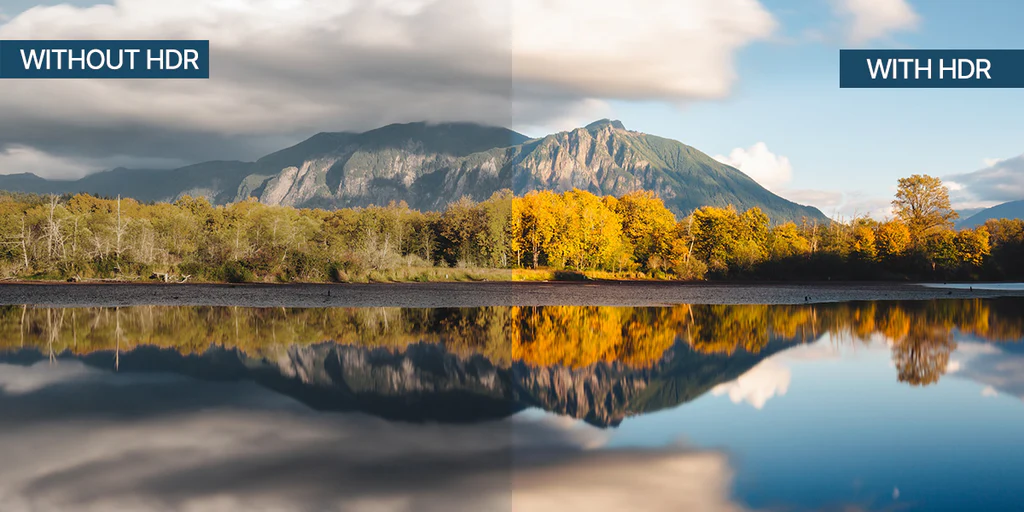
The advancement of 4K is not just about sharpness, but better pixels. Most 4K displays come equipped with high dynamic range (HDR) technology. HDR is like giving your picture more dynamic range, meaning it can have much brighter highlights, and much deeper, inky blacks, all in the same frame. This increase in contrast, in addition to a wider range of colors, allows the image to pop, in a very realistic fashion.
Content Availability and Your Internet Speed
In the present day, 1080p content is everywhere. However, 4K content is quickly becoming the new norm across the major streaming services, which includes Netflix, Disney+, and YouTube. The only thing you must keep in mind, is bandwidth. To consumption 4K video without annoying buffering, you will need a sufficient internet connection (>25 mbps per recommendation from most services).
Which One Is Better for You? 4K or 1080p?
You Should Go for 4K if...
- You’re going big with your screen size. For any TV over 55 inches or a projector screen over 100 inches, the benefits of 4K are impossible to miss.
- You’re a movie buff or a serious gamer. You crave the most immersive and visually stunning experience possible. The combination of 4K and HDR is a game-changer.
- You want to future-proof your setup. You’re investing in a device you want to last for years, and you want it to be ready as more and more content becomes 4K-native.
- Your budget allows for it. You are comfortable paying a premium for a top-tier visual experience.
You Should Stick with 1080p if...
- You’re building a setup on a budget. You can get fantastic picture quality for a fraction of the price of a 4K setup. It’s all about getting the most bang for your buck.
- You have a smaller screen. On a TV under 50 inches or a laptop screen, your eyes simply won’t be able to resolve the extra detail of 4K from a normal viewing distance.
- Your internet connection is slow or unreliable. If you can’t consistently get 25 Mbps, you’ll have a much better experience streaming flawless 1080p than buffering 4K.
- You mostly watch broadcast TV or older content. The majority of cable channels and older shows are still broadcast in 1080p or lower, and they will look great on a native 1080p display.
Conclusion
It depends on your viewing distance and screen size. On small screens or from far away, your eyes might not detect much difference. On larger screens (55”+ TVs or projectors), 4K’s finer details and smoother edges become very noticeable.
Not necessarily. Poorly mastered or upscaled 4K content may look no better than a high-quality 1080p source. The quality of encoding, HDR, and color grading all play big roles.
Most streaming platforms like Netflix or YouTube recommend at least 25 Mbps per stream for 4K playback without buffering.
Yes. 4K requires more bandwidth, more GPU processing power, and larger data storage. If you’re streaming over mobile data, expect higher data consumption.
Absolutely—especially if your projection size exceeds 100 inches. The additional pixel density makes images look sharper and more lifelike. For smaller portable projectors, a good 1080p model can still deliver excellent clarity.
Yes. Your device will automatically upscale the content to fit the screen. The result won’t be true 4K, but most modern projectors and TVs do a good job of smoothing edges and improving sharpness.
In many cases, yes. HDR can provide more noticeable improvements in contrast, brightness, and color depth than the jump from 1080p to 4K resolution alone.