In the world of modern home entertainment, Bluetooth connectivity in projectors has become a standard yet often misunderstood feature. While most of us use Bluetooth daily with our phones and headphones, its role in projection technology is specific and crucial for creating a clean, wire-free setup.
Whether you are looking for a Bluetooth 5.0 projector or trying to connect your soundbar to an existing device, understanding how this technology works will help you make the best buying decision.
What is Bluetooth in the Context of Projectors?
At its core, Bluetooth is a short-range wireless technology standard that acts as a bridge between your projector and other devices.
However, a common misconception needs to be addressed immediately: In the vast majority of projectors, Bluetooth is used strictly for AUDIO transmission, not video.
While Wi-Fi is used to screen mirror (Cast/AirPlay) movies from your phone to the projector, projector Bluetooth capabilities are designed to handle the sound. This allows you to upgrade your cinematic experience by bypassing the typically small built-in speakers of a projector.
Types of Bluetooth Connectivity: Input vs. Output
Not all “Bluetooth projectors” are created equal. Depending on the model, the Bluetooth function can work in one direction or two. It is essential to check the specifications for Bi-Directional Bluetooth.
Bluetooth Output (Transmitter Mode)
This is the most common feature users look for. In this mode, the projector acts as the source. It sends the audio signal wireless to an external device.
Use Case: Connecting your projector to a powerful Bluetooth Soundbar, a Surround Sound System, or Bluetooth Headphones for private viewing at night.
Benefit: Eliminates the need for long AUX or HDMI (ARC) cables running across the room.
Bluetooth Input (Receiver Mode)
Some advanced projectors feature Bluetooth Input. This turns the projector itself into a Bluetooth speaker.
Use Case: You connect your smartphone to the projector via Bluetooth, keep the projector lens off (if supported), and use the projector’s built-in speakers to play music from Spotify or Apple Music.
Benefit: Makes your projector a multi-purpose device.
Why Bluetooth Versions Matter: 4.2 vs. 5.0 vs. 5.2
When shopping for a new device, you will often see terms like “Bluetooth 5.0 projector” highlighted in marketing materials. Does the version number really matter? Yes, especially for video synchronization.
Speed and Range
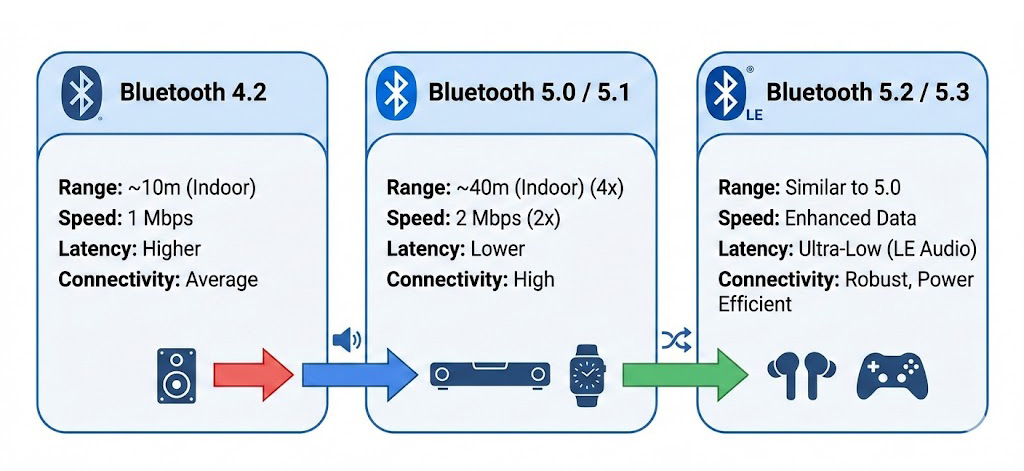
Bluetooth 4.2: Older technology. It has a shorter range and slower data transmission speeds.
Bluetooth 5.0 & 5.1: Offers twice the speed and four times the range of 4.2. This is the current standard for quality projectors.
Bluetooth 5.2/5.3: The latest standards focusing on power efficiency and higher audio quality (LE Audio).
The Latency Issue (Lip-Sync Delay)
The biggest challenge with Bluetooth connectivity in projectors is latency—the slight delay between the picture on the screen and the sound in your ears.
Legacy Bluetooth: May result in noticeable lag where the actor’s lips move before you hear the voice.
Bluetooth 5.0+: Significantly reduces latency, ensuring a synchronized viewing experience.
| Feature | Bluetooth 4.2 | Bluetooth 5.0 / 5.1 |
| Data Speed | 1 Mbps | 2 Mbps (Faster) |
| Range | ~10 Meters (Indoor) | ~40 Meters (Indoor) |
| Latency | Higher (Risk of audio lag) | Lower (Better sync) |
| Connection Stability | Average | High |
Common Myths About Projector Bluetooth
To ensure you aren’t disappointed with your purchase, let’s debunk two major myths regarding projector Bluetooth technology.
Myth 1: “I can use Bluetooth to send video from my phone to the projector.”
Fact: No. Bluetooth does not have the bandwidth to transmit high-definition video (1080p or 4K). To send video wirelessly from your phone, you must use Wi-Fi Mirroring (Miracast, AirPlay, or DLNA), not Bluetooth.
Myth 2: “I can connect two pairs of headphones at once.”
Fact: This depends heavily on the projector’s hardware (Dual Audio support). Most standard projectors can only connect to one Bluetooth audio device at a time.
How to Connect an External Speaker to Your Projector
If you have a Bluetooth 5.0 projector, pairing is usually straightforward. Follow these general steps:
Turn on the Speaker: Set your Bluetooth speaker or headphones to “Pairing Mode” (usually a flashing blue light).
- Access Projector Settings: Go to the projector’s ‘Settings’ menu and find the ‘Bluetooth’ or ‘Remotes & Accessories’ tab.
- Scan for Devices: Select “Add Accessory” or “Scan.”
- Pair: Select your speaker from the list.
- Test: Play a video to ensure the sound is coming through the external speaker and verify there is no audio delay.
What if there is Audio Lag?
If you experience lip-sync issues, check if your projector settings have an “Audio Delay” or “Lip Sync” adjustment slider. Alternatively, try disconnecting other Bluetooth devices in the room to reduce interference.
Conclusion
Absolutely. In 2024 and beyond, buying a projector without Bluetooth connectivity limits your audio options significantly. Opting for a model with Bluetooth 5.0 or higher ensures that you can enjoy an immersive, cinema-like sound experience without the clutter of wires.
Whether you are gaming, watching movies, or simply listening to music, Bluetooth capability is a “must-have” feature for any modern home theater setup.