A projector distance is useful only when you know where it starts and ends. Before approving a room layout, identify both reference points in the selected model's installation drawing. A lens-to-screen distance, a rear-edge-to-wall gap, and a rear-edge-to-projection-surface distance describe different measurements.
For an OEM buyer, distributor, or installation team, the practical deliverable is a marked drawing tied to a specific projector and screen. A distance copied from a sales sheet is not enough to approve a cabinet, bracket, or finished room.
Identify the two ends of every dimension
Start with the arrow, not the number. Mark its first reference point, its second reference point, and the unit. Keep the drawing's label beside that record so another person can trace it back.
Use separate worksheet rows for an optical distance, a cabinet clearance, and a mounting dimension. Do not rename all three “throw distance” in a quotation. If a document says only “distance from projector,” ask for the drawing before accepting the figure.
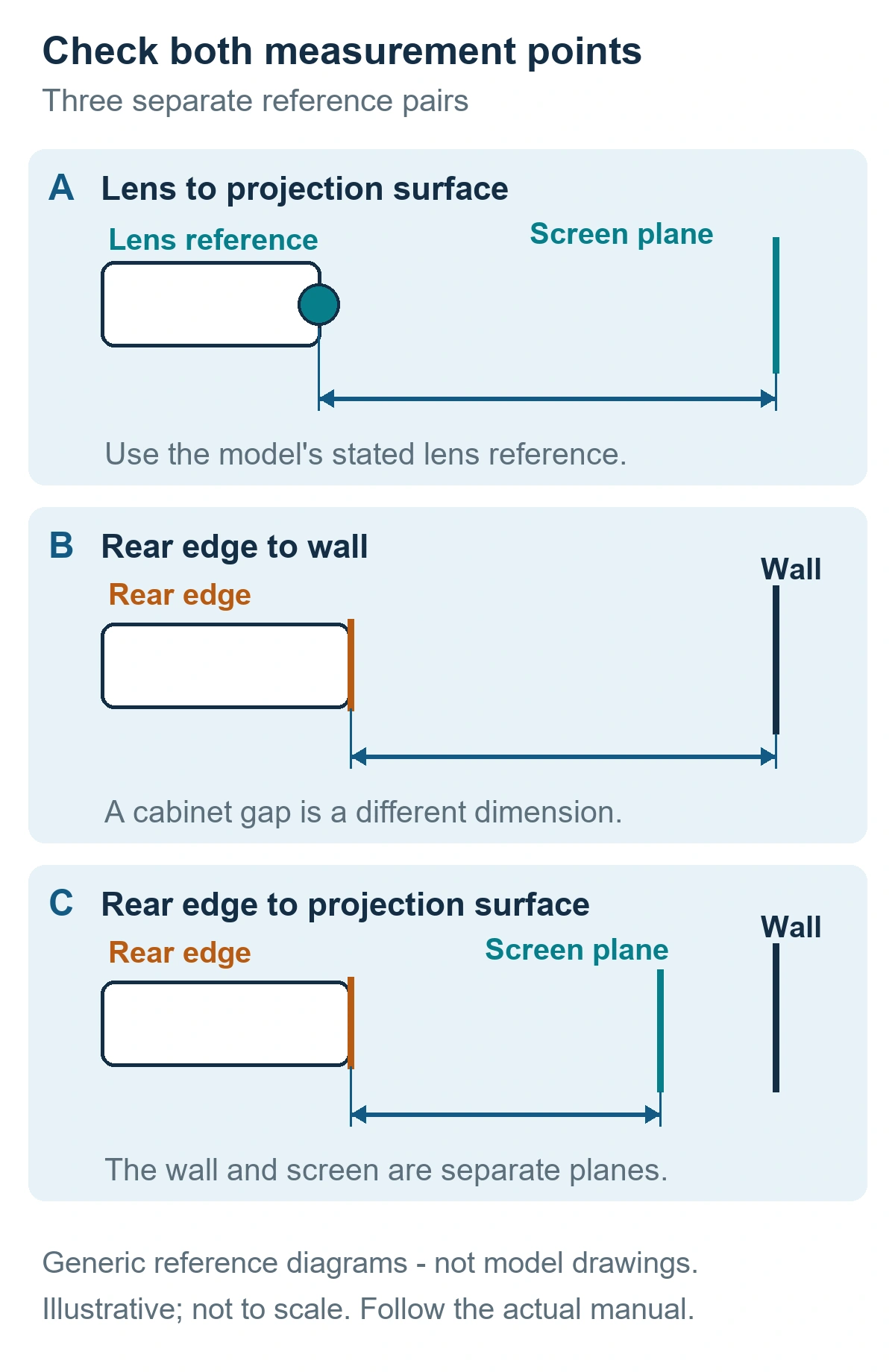
Generic reference diagrams, not model drawings. The panels distinguish measurement endpoints; they do not reproduce a projector's construction or dimensions. Illustrative and not to scale.
Read the projection table with its drawing
The BenQ MH760 manual is one model-specific example. Its installation section relates projected image size to lens-to-screen distance, zoom, and image format. Its projection table gives minimum and maximum distances associated with the zoom range. Those values describe that projector; they are not installation values for another model. [1]
A useful document review asks:
- Does this table belong to the exact projector and lens being purchased?
- Does its row use the intended image size and aspect ratio?
- Which drawing defines the distance reference?
- Does the value apply at a particular zoom setting or across a range?
- Which revision of the manual or installation drawing is attached?
A manufacturer’s throw-ratio specification can support an initial image-size and distance estimate when used with that model’s stated reference. It does not replace the installation drawing or establish the cabinet-to-wall gap.
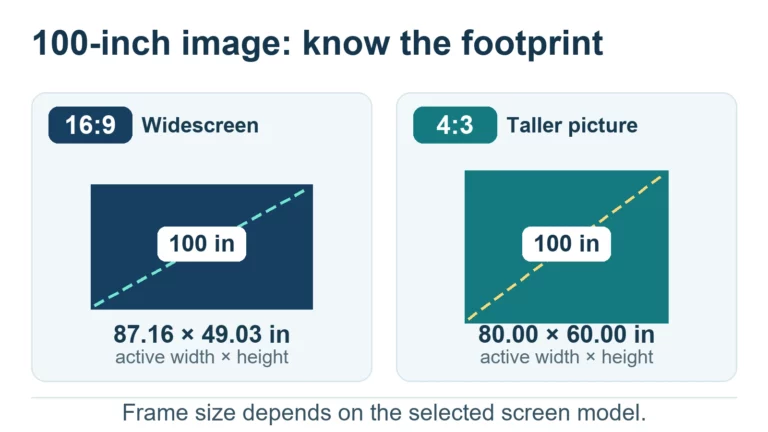
Keep image geometry in a separate part of the brief. Our image-dimensions and frame-fit guide explains how the intended diagonal and aspect ratio translate into the active image's width and height.
Give ultra-short-throw dimensions their own labels
The BenQ LH890UST family manual illustrates why reference points matter. In its model-specific projection diagrams and tables, D refers to the projector's rear edge to the wall, while a refers to the rear edge to the projection surface. It distinguishes arrangements with 0 mm and 30 mm screen thickness and advises checking the actual unit before permanent installation. [2]
Do not transfer that letter convention to another projector. A different manual may assign the same letter to another dimension. Read the arrows and legend together.
For a UST installation review, request two marked positions: the actual wall plane and the actual projection surface. Then mark the cabinet edge used by the manufacturer's drawing. This turns an ambiguous “wall gap” request into a dimension that the supplier and installer can discuss consistently.
Build an installation-reference worksheet
Use the following worksheet as a document-control aid. It is an original planning template, not a manufacturer specification or a substitute for an installation manual. Fill it from the selected model's current documents and record unresolved items explicitly.
| Field | What to record | Acceptance question |
|---|---|---|
| Product identity | Projector model, lens if applicable, hardware revision | Are all supplied documents for this configuration? |
| Drawing identity | Document title, revision, page, and diagram label | Can another person locate the same drawing? |
| Image target | Active image diagonal, aspect ratio, width, and height | Are the image and screen-frame dimensions kept separate? |
| Distance reference | First endpoint, second endpoint, and original letter | Do the worksheet and drawing name the same physical points? |
| Value and unit | Stated distance or range, including units | Is the value copied without converting a range into one promise? |
| Zoom and mode | Relevant zoom position and documented conditions | Does the selected table row apply to this setup? |
| Surface reference | Wall plane, projection surface, screen build-up | Is the intended measurement plane marked on the drawing? |
| Mechanical fit | Cabinet/bracket outline, access and cable routing to confirm | Has the installer checked the physical layout separately? |
| Sample verification | Actual unit identity, measured placement, projected image | Has the proposed setup been tried before final approval? |
| Open issues and sign-off | Missing information, responsible person, review date | Is each unresolved item assigned before installation? |
For each distance, add a short line in this format:
Drawing label: ____ / From: ____ / To: ____ / Value and unit: ____ / Conditions: ____ / Evidence page: ____
Do not fill a missing dimension by combining figures from different models. Send the open worksheet row back to the document owner. Keep the original drawing alongside the completed worksheet so later reviewers can see what was measured.
Check the actual unit before committing the installation
Treat the document review and the physical trial as two separate records. The first establishes what the manufacturer states. The second records what the identified sample does in the proposed installation.
A practical trial record should identify the unit, screen, mounting arrangement, image target, and the two endpoints used for the measurement. Photograph the setup and retain the marked drawing. Record whether the intended image fits the usable surface and whether the chosen position leaves the access the installation needs.
Use the wider projector sample testing checklist for the rest of the product evaluation. This worksheet addresses placement references; it does not certify brightness, focus uniformity, safety, or the complete product.
If a trial and a document disagree, pause final placement approval. Record the difference with units and photographs, then request clarification against the same model, lens, and drawing revision. A silently adjusted cabinet drawing makes the mismatch harder to resolve later.
Send a complete placement brief
For an OEM/ODM projector discussion, prepare the intended active image size and aspect ratio, a marked wall-and-screen section, the available installation space, and the selected model or configuration under review. Add the worksheet and a list of missing dimensions.
Contact TOUMEI with your placement brief to discuss the information needed for your project. Ask which current model documents and sample checks apply before treating a preliminary layout as final.
Frequently Asked Questions
1. Which reference point should I use for an installation distance?
Use both endpoints shown in the selected model’s drawing. Keep the manufacturer’s label with the measurement; do not replace a cabinet reference with a lens reference.
2. Can I use the gap between the cabinet and wall as the projection distance?
Only when the applicable drawing defines that specific value that way. Record a rear-edge-to-wall gap separately from an optical or rear-edge-to-screen measurement.
3. Why should I distinguish the wall from the projection surface?
They can be different reference planes. Mark both in the layout and use the plane named by the model's drawing. Confirm any screen build-up from the actual screen design.
4. Is a throw-ratio estimate enough to finalize a cabinet or mount?
No. Use it for preliminary planning, then check the exact model drawing, projection table, and physical fit. Keep the estimate separate from the approved installation dimensions.
5. What should I do if the supplier's distance table has no drawing?
Request the corresponding drawing and its revision before approving placement. Ask the supplier to identify both endpoints, units, image format, and any applicable zoom or setup conditions.
6. When should the installation distance be checked with an actual projector?
Check the identified unit in the intended arrangement before finalizing a permanent installation. Record the setup and measured references so a later sample or configuration change can be reviewed against the same baseline.
Sources
- BenQ, MH760 Digital Projector User Manual, V1.00; printed pages 14–15, installation guidance and projection dimensions. Accessed October 29, 2026. The cover date was not verified. Model-specific values are not transferred to other projectors.
- BenQ, LH890UST family User Manual, V1.01; printed pages 15–17, projection diagrams and tables. Accessed October 29, 2026. The reference letters, screen-thickness cases, and installation conditions belong to this manual.